

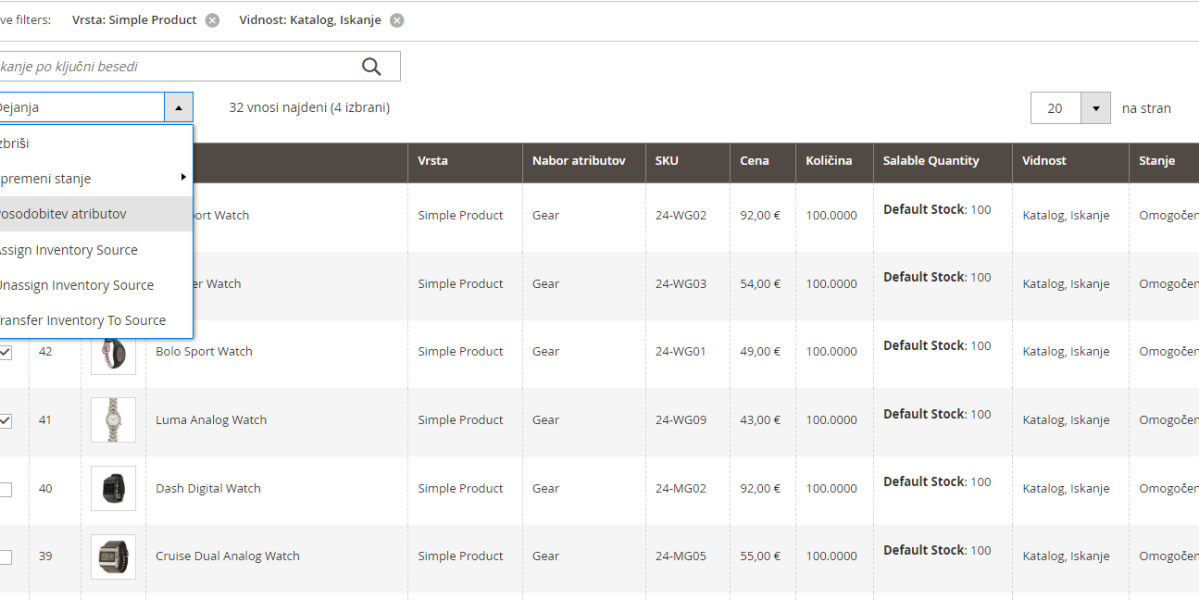
Managing an online store requires quite a bit of work to set everything up as needed, and usually, the most time-consuming task is editing products. It often happens that once we have already set up all the products, we realize that it would be good to add an additional field to the product to enable filtering or something similar.
To avoid having to open and edit each product individually, we can collectively edit all products with the same value. When we are on the product list, we simply filter by the selected parameter all the products we want to choose and mark them (this can be done for all products in the selection). Once we have selected the products, we check if the number of selected products matches, as it may happen that we select one product too many if we are not careful. After checking, under actions, we choose the option "refresh attributes" and confirm the actions.
Then a new page opens with all the attributes, and there we find the product attribute we want to change, mark it for change, select or enter the desired value, and click save. And the task is completed.
In Magento 1, if more products are selected, we have to wait for the request to be processed and see if the task was completed. Meanwhile, in Magento 2, the change is saved in the list and processed when the server runs the execution via a cron job.
This option can be very helpful if, for example, we want to add a brand attribute. Usually, the brand is already in the product name, so we just filter the products by brand name (e.g., Adidas) and then mark all the products that appear and assign them the value of the brand attribute now Adidas. Now we have the option to set the attribute to be available for filtering or to use it to create additional displays and pages, etc.
Video instructions for mass editing of products

My name is Anže and I am a Magento certified solution specialist and builder of many award-winning online stores. I am the architect of all Degriz projects.
Write to me →