


An assignment says which products get which data. One assignment can apply to all products, a category (with its subcategories) or a brand (a value of the brand attribute, by default manufacturer or brand).
1. Add an assignment
Catalog › GPSR › Assignments
Click Add assignment, choose All products, Category or Brand (attribute value) under Scope, then the category or brand.
For Manufacturer and EU responsible person choose Inherit (the value comes from a higher level), Set (you pick a record) or None (not needed) (for example a manufacturer in the EU needs no responsible person).
Optionally tick pictograms, enter warnings and instructions for safe use (one paragraph per line, per store view) and add documents (PDF, PNG, JPG or a link).
If the products of this assignment must have warnings, switch on Products must have warnings: the report will mark products without warnings.
2. How a product inherits the data
Each role (manufacturer, responsible person) is decided on its own, in this order:
- the product (fields in the GPSR group on the product),
- the brand,
- the category (the deepest wins; at equal depth the lower Priority),
- all products.
Warnings, instructions, pictograms and documents add up over all levels by default. If you want the narrowest level only, switch off Merge warnings and pictograms in the settings.
3. On the product: overview and override
Catalog › Products
The product has a GPSR group. Its title shows the status (complete, manufacturer missing, not required), and above the fields is an overview: what the customer sees and where each value comes from.
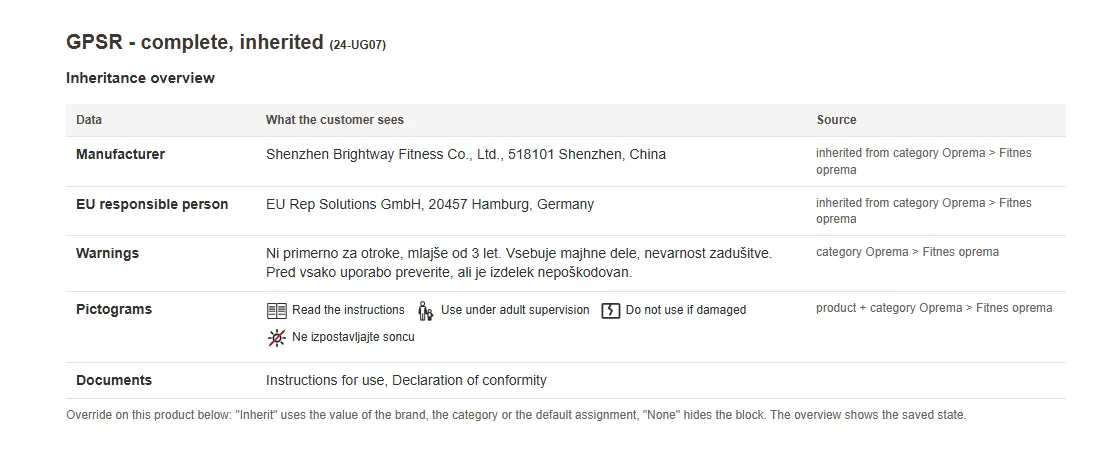
- Manufacturer and EU responsible person: empty means inherit, a chosen record overrides the inheritance, None hides the block.
- Model (identification) and Batch or serial number: the product identification (an empty model shows the SKU). The EAN is read from the attribute you choose in the settings.
- Additional warnings of the product and instructions: per store view, added to the warnings of the category and the brand.
- GPSR not required: for example services or gift cards. The section is not shown and the product does not count as missing data.
If you save a product without a manufacturer, Magento warns you but does not block the save.
4. What the customer sees
