

Products in your online store are mostly divided into categories. Categories are displayed on your online store page, allowing visitors to navigate more easily to the desired products. A product can be stored in one or more categories simultaneously.
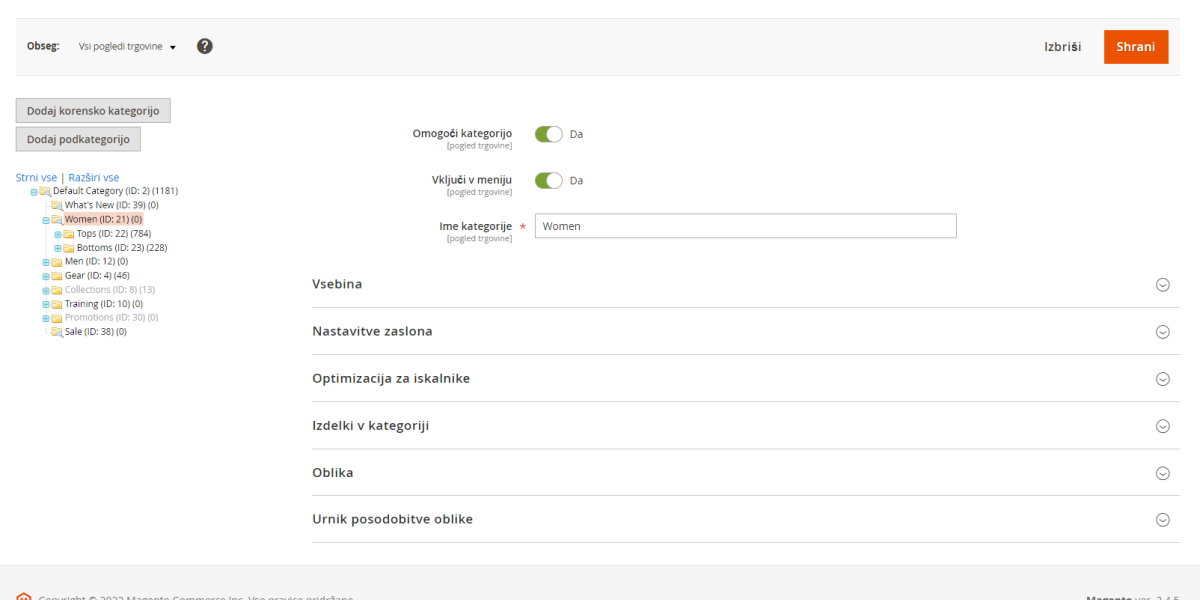
Editing categories is quite simple. On the left side, you have a list that you can easily and quickly change by grabbing a category and dragging it to the desired position, thus changing the layout. You edit the content of an existing category by clicking on the category name, and available fields will appear on the right.
To add a new category, there is a "Add Subcategory" button above the list. If you want to add a subcategory to a category, click on the selected category before clicking the button. The default category "Default category" should not be changed, but new category items should be added under it.
Video instructions for editing categories in Magento 2 online category
Detailed explanation of category editing options
Enable category - This option allows you to enable or disable a category. You should know that if you enable a category, its link will point to a non-existent 404 page, so if a category is inactive for a long time, it's good to redirect it to another category.
Include in menu - If you want to have a category active but not in the menu, it's best to disable this option. This way, categories can be used as landing pages for special promotional campaigns.
Category name - The category name is the displayed name in the menu and on the category page. It's good to name a category with keywords that customers search for. For example, instead of just "Men," it could be "Men's clothing."
Content
Category image - If we want an additional image of this category on the category page, we add it in this field. Adding images is usually good when we have a pre-prepared theme so that images are cropped to an appropriate size and do not slow down page loading. It's also good when we have a programmed display of subcategories, as images make the entire display more visually appealing.
Description - In the newer version of the Magento 2 system, I have the option to edit via drag and drop here, and this functionality can be well used when using a category as a landing page, as we can dynamically display the description content.
It's good to have category descriptions written for search engine optimization, writing a few sentences with current keywords.
If we have special content for search engines, Magento categories can be further expanded with an additional description field that appears at the end of the item list, so it doesn't affect browsing the categories.
Add CMS block - This option allows us to display content from a desired static block on the category page.
Display settings
Display mode - allows the option to choose between displaying a static block or items and both together.
Anchor - this is important when we want to have filtering and displayed items from subcategories on the category.
Available product list sort by - Here we determine which sorting options are available on the category if we want to limit this option on the category.
The option is to expand functionalities with other options, such as sorting by price, position, and name.
Default product list sort by - If you want to change the sorting on a specific category to be different from the default, you can do so in this field.
Price step layered navigation - If we have price filtering on the category where price options are separated, we can define the amount of separation for this filtering in this field.
Search engine optimization
URL key - Here you enter the link where the category is accessible. If this field is not filled, the link is generated from the category names.
Meta title - The title is what is displayed in the browser tab and the first line in the search engine result.
Meta keywords - These are important keywords intended for search engines to more easily find the important keyword for the category. Keywords are separated by commas, and if written, they should be up to 15 in order of importance, with the most important first.
Meta description - The description is also for search engines and is visible in search engine results immediately after the title. It should be up to 150 characters.
Products in category
In this section, you can easily add all the items that belong to this category. In the first selection, choose the option "No" and then just filter by form and select the desired items.
If you have requests for additional columns for filtering, they can be further expanded/programmed.
Layout and layout update schedule
Some themes have the option to assign different layouts to categories, and these fields allow us to make these changes in these two tabs. Of course, we must have pre-prepared different layouts for the category page in the theme. Except for the layout, which is available in most themes, allowing side column displays, etc.

My name is Anže and I am a Magento certified solution specialist and builder of many award-winning online stores. I am the architect of all Degriz projects.
Write to me →