

Installation
For existing Degriz customers we install the module free of charge. For other buyers we charge the installation by time spent.
 Online store configuratorAssemble a store from modules and see the price right away.Open the configurator
The module reads the bank statement (CAMT.053 or CSV), finds the order for every credit and issues the invoice for an exact match. What is not certain waits in a review list with one click. Every action is written to the order history.
€590 + VAT · one-off licence, no subscription

“Every morning I open online banking and look for who paid which order. Then I issue the invoices by hand.” Anyone who sells with payment by bank transfer (UPN QR, Hub3, plain transfer) does this every day.
In the morning the bank statement arrives, by e-mail or as a file you upload. The module reads 12 credits and shows a preview: “9 match, 3 for review”. For the nine, the reference and the amount equal the order, so they get an invoice, the orders move to Processing and the customers get “Payment received”. One payment is 40 EUR for a 50 EUR order: the module does not invoice it by itself, it shows a partial payment and asks whether you wait for the rest. One transfer has no reference, but the name and amount fit exactly one order: a suggestion at 80 %, confirm with one click. Nothing happens without a trace: every action is in the order history.
For shops whose customers often pay by invoice or UPN QR: toner, office supplies, B2B, anything where there are so many transfers that searching the statement takes an hour or more every day. It pairs well with the Magelan UPN payment slip and Hub3, because it understands their reference.
In Stores › Configuration › Magelan › Bank reconciliation you enter the shop’s IBAN and pick the payment methods to reconcile. Then in Sales › Operations › Bank reconciliation › Upload statement you upload one statement and read the preview. The mailbox and the server folder can follow later. If you like, we do the first import together and check that your bank reads correctly.
Buy the module and we install it for you: free of charge for existing Degriz customers, by time spent for others. Building a new store? Add it to your project in the Konfigurator.
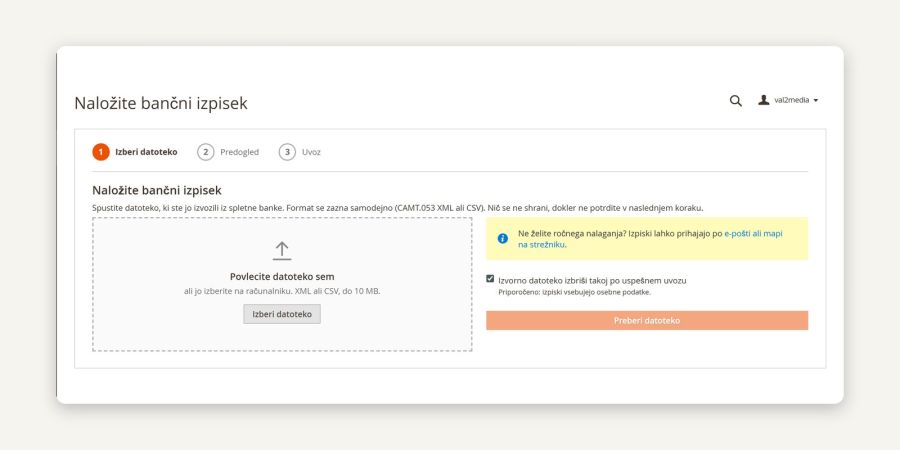
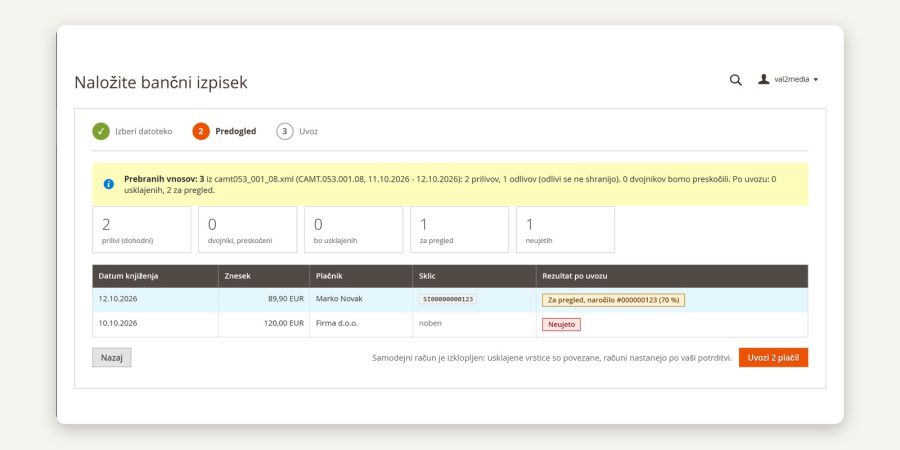
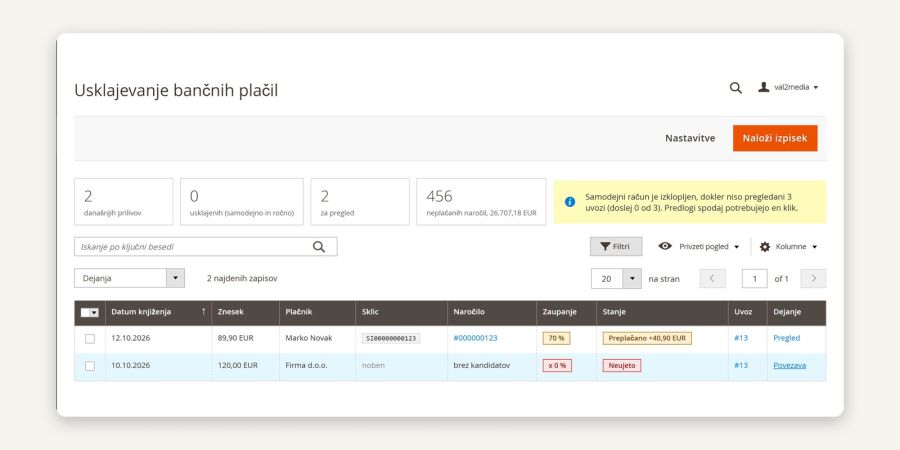
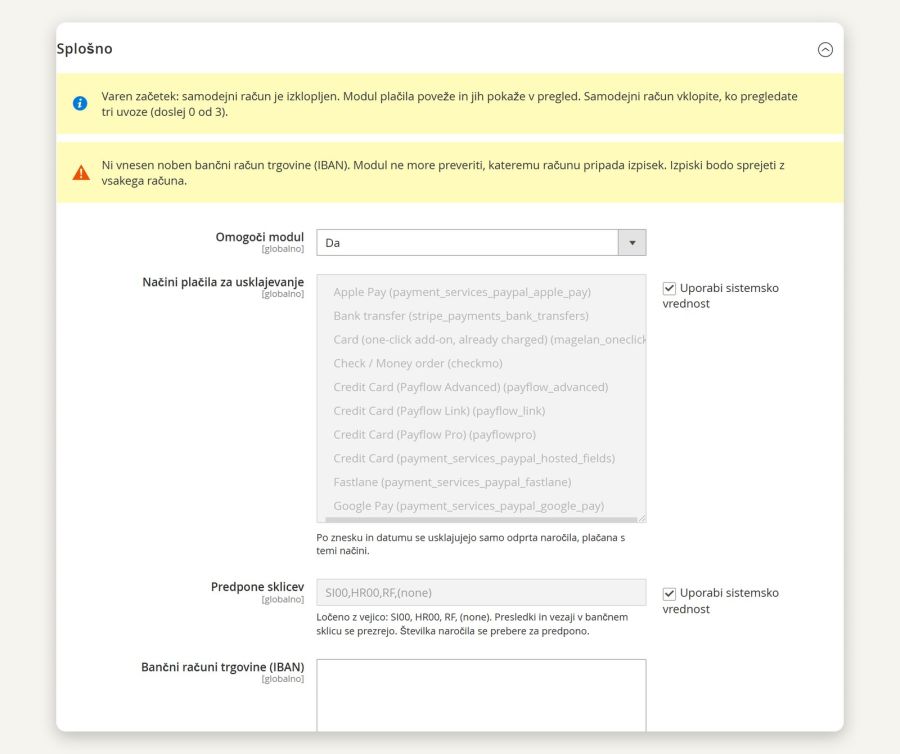
Our guide centre shows the settings and the everyday work with this module, with real screenshots.
The module is in development, so there are no installation instructions yet. We will publish them on this page when it is ready.
Just the facts.
We develop and maintain the module ourselves, so you write to the people who know it line by line.
For existing Degriz customers we install the module free of charge. For other buyers we charge the installation by time spent.
A bug that repeats on a clean Magento with the Luma theme we fix free of charge. Settings, customisations and other themes by time spent.
The licence includes updates for the Magento versions on the supported list.
We agree on a date after reviewing the request. User guides in the guide centre
One-off licence for one production installation of Magento, no subscription.
For existing Degriz customers we install the module free of charge, for others by time spent. We agree on a date after reviewing the request.
Which banks do you support?
The module reads the standard CAMT.053 format (all versions) and CSV from online banking. It is not tied to a particular bank. It has been tested on prepared samples; we will publish a list of banks tested with real statements once we have one. The preview before import shows what the module read before anything is written.
Does the module issue the invoice by itself?
Only if you switch it on. Automatic invoicing is off by default: the module matches the payments and shows them for review, and the invoice is created with one click. Once you have reviewed a few imports, you can switch automatic invoicing on; it issues an invoice only if the reference, the amount and the payment method match exactly one open order.
What happens if the customer pays too little or too much?
Too little: the module shows a partial payment and does not issue the invoice. You choose whether to wait for the rest or invoice the whole order. Too much: the invoice is for the order amount and the difference stays visible until you mark it as handled. Partial payments for the same order are added up automatically.
What if the customer paid but the order was already cancelled?
The payment gets a special status and nothing changes on the order. You decide: a refund or a new order.
Do I have to upload statements by hand?
Not necessarily. Besides manual upload, statements can arrive by e-mail to a dedicated mailbox or to a folder on the server where your bank's automation drops them.
Do I need a special PHP extension for e-mail?
No. The module reads the mailbox itself, without the IMAP extension, and verifies the server certificate. Gmail and Microsoft 365 usually require an app password or OAuth; we recommend a dedicated mailbox for statements.
What if I upload the same statement twice or statements overlap?
Every payment has its own key and is stored once. The module recognises the same file and tells you when it was imported.
What does the module store about payers and for how long?
Only incoming payments: name, encrypted IBAN, purpose, amount and date. Outgoing payments are discarded after reading. Source files are deleted after 14 days (configurable); the payer's name, IBAN and purpose are removed after 24 months (configurable); amount, date and the link to the order stay. The module is not an archive of statements: keep the originals in your bookkeeping as required by law, generally 10 years in Slovenia. Roles without the permission see the payer hidden.
Does it work with Flik or card payments?
No, those payments are not on the bank statement. The module is for bank transfers: UPN QR, Hub3 and plain transfers.
Does it work with the UPN payment order and Hub3 modules?
Yes, it understands their reference (SI00 and HR00 with the order number). It also works with other payment methods that you choose in the settings.
What if the module does not recognise my CSV columns?
A screen opens where you choose once which column is which, and the module remembers the layout.
Do you help with installation and the first import?
Yes. We do the installation and a test on a statement from your bank by the hour; at the first import we check together that your bank is read correctly.
 Product export for marketplaces & price comparisonYour products, prices and stock on Ceneje.si, Shoppster and Google Merchant Center. The file refreshes by itself, with no manual uploads.€180 + VAT
 DataLab Pantheon integrationThe connection is in development. Orders will go from the store into Pantheon, and stock and prices back into the store, with no retyping. We do the first rollout together with you.Price on request
 ERP connector: orders, stock and pricesEvery web order reaches your ERP (Birokrat, SAOP iCenter) exactly once, while stock and prices flow back into the store.€890 + VAT
Write to us and we will answer personally.
Online store configurator
Put your own quote together in the configurator and see the price straight away. A few minutes, no obligation, no meeting needed.
Free and with no obligation
We use cookies for the proper functioning of the site, visit analytics and showing ads tailored to your interests. Read more in our privacy policy. By clicking "Accept all" you agree to the use of all cookies.
Necessary cookies enable core functionality such as security, network management, and accessibility. You may disable these by changing your browser settings, but this may affect how the website functions.
| Cookie name | Cookie purpose |
|---|---|
| PHPSESSID | Preserves the visitor's session state across page requests. |
| magelan_geo | Remembers that the visitor closed the suggestion of the other language version of the store, so it is not shown again. |
| form_key | Protects visitor's data from Cross-Site Request Forgery Attacks. |
| guest-view | Stores the Order ID that guest shoppers use to retrieve their order status. Used in “Orders and Returns” widgets. |
| login_redirect | Preserves the destination page the customer was loading before being directed to log in. |
| mage-banners-cache-storage | Stores banner content locally to improve performance. |
| mage-cache-sessid | The value of this cookie triggers the cleanup of local cache storage. |
| mage-cache-storage | Local storage of visitor-specific content that enables ecommerce functions. |
| mage-cache-storage-section-invalidation | Forces local storage of specific content sections that should be invalidated. |
| mage-messages | Tracks error messages and other notifications that are shown to the user, such as the cookie consent message, and various error messages. The message is deleted from the cookie after it is shown to the shopper. |
| private_content_version | Appends a random, unique number and time to pages with customer content to prevent them from being cached on the server. |
| section_data_ids | Stores customer-specific information related to shopper-initiated actions such as display wish list, checkout information, etc. |
| user_allowed_save_cookie, cookie_consent | Stores the user's cookie consent state for the current domain. |
| X-Magento-Vary | Configuration setting that improves performance when using Varnish static content caching. |
Preference cookies are used to store settings and information that changes the website look and functionality.
| Cookie name | Cookie purpose |
|---|---|
| store | Remembers the user's selected language version of a website. |
Marketing cookies help us provide our visitors with relevant content, browsing history, and product recommendations.
| Cookie name | Cookie purpose |
|---|---|
| product_data_storage | Stores configuration for product data related to Recently Viewed / Compared Products. |
| recently_compared_product | Stores product IDs of recently compared products. |
| recently_compared_product_previous | Stores product IDs of previously compared products for easy navigation. |
| recently_viewed_product | Stores product IDs of recently viewed products for easy navigation. |
| recently_viewed_product_previous | Stores product IDs of recently previously viewed products for easy navigation. |
| _fbp | This cookie is installed by Facebook to store and track visits across websites. |
Analytics cookies help us understand how our visitors interact with the website. It helps us understand the number of visitors, where the visitors are coming from, and the pages they navigate. The cookies collect this data and are reported anonymously.
| Cookie name | Cookie purpose |
|---|---|
| dc_gtm_* | Throttles request rate when Google Analytics is deployed with Google Tag Manager. |
| _ga, _gat, _gid, _ga_*, _gat_* | This cookie is installed by Google Analytics. They are used to collect information about how visitors use our website. We use the information to compile reports and to help us improve the website. The cookies collect information in a way that does not directly identify anyone. |