In the past, I have written quite a few blog posts about how to improve the optimization of online stores, and I regularly share this information with my clients. Nevertheless, I have noticed that the same problem often arises – online retailers do not know which keywords to optimize for.
They often think too much from their own perspective instead of putting themselves in the role of their customer. It is important to understand how a potential customer searches for products, how certain keywords lead them to the online store, and how they then decide to make a purchase.
Google Search Console (GSC) is one of the most important tools for any online retailer who wants to improve their visibility in the Google search engine. With it, you can track which keywords your online store ranks for, which pages attract the most traffic, and how to improve existing rankings. In this post, we will take a detailed look at how to obtain relevant data from GSC for optimization.
1. Accessing keyword data
First, log in to Google Search Console. Once logged in:
- Select your website.
- Click on "Performance" in the left menu.
- A review of search queries that brought visitors to your site will be displayed.
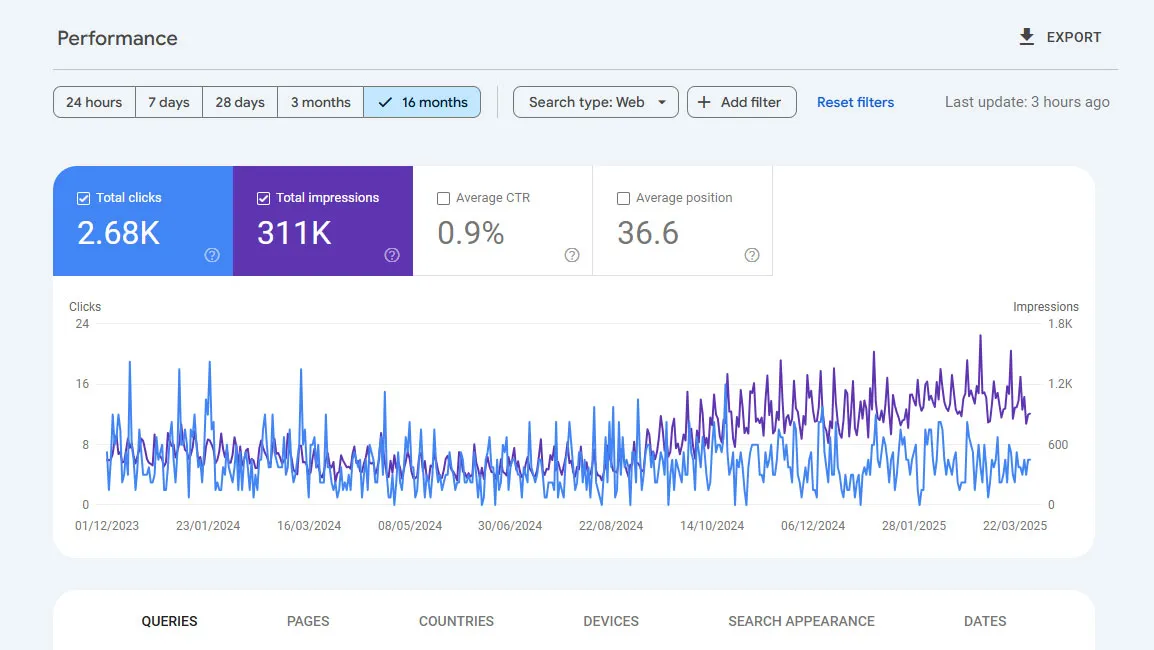
Under the "Queries" tab, you will see a list of keywords that users searched for your site, along with data on clicks, impressions, average position, and CTR (Click Through Rate – the ratio of impressions to clicks).

2. Checking current keyword placement
In the same "Performance" tab, you can analyze:
- Average position: Shows where your page is located in the search engine for a particular keyword.
- CTR: If you have many impressions but few clicks, it means that your meta description or title may not be attractive enough.
- Impressions and clicks: Compare keywords with the most impressions and clicks and identify those with potential for improvement.
Tip: Use the "Position" filter and set the limit between 10 and 30 to extract keywords that are close to the first page of Google and can be raised higher with a little optimization.

Concrete example: In the image above, you can see an example of keywords that have a high number of impressions (purple line) but a low CTR (turquoise line). This means that people see the page in the search engine but do not click on it. This may mean that the title and description are not attractive enough or do not meet the expectations of searchers. So I need to improve the meta descriptions and meta title for the page to make it more attractive, as this will get me more clicks and improve the CTR.
3. Identifying keywords with high search potential
One of the key steps is identifying keywords that have a lot of searches, but your page is not among the top ten results for them. Such keywords have great potential for improvement, as you can gain more traffic with a few adjustments.
In Google Search Console, you can check this by:
- Setting the "Position" filter (triangle icon with lines) and specifying that you want to see keywords that are above the 10th position.
- Checking which of these keywords have a lot of impressions (sort by the number of impressions "Impressions").
- Assessing whether these keywords are important for your online store.

Concrete example: In my analysis, I noticed that I have several keywords that are in the 11th–80th position, including "website development". This keyword has great potential for improvement, as it is related to my services. The likelihood is that someone searching for online store development is also searching for "website development". On the other hand, "website optimization" may not be as important because I do not offer paid SEO services to clients (I do, of course, share free advice), so it may not be worth investing so much energy in optimizing for it.
5. Which pages attract traffic to keywords
Google Search Console also provides insight into which pages on your website are associated with individual keywords:
- Click on the "Pages" tab.
- See which pages generate the most traffic.
- Then click on an individual page to see which keywords lead to it.
This allows you to determine whether the content on these pages is well optimized or has potential for improvement.
4. How to improve rankings
Once you have insight into the data, you can take the following steps to improve positions:
- Optimize meta titles and descriptions: Add keywords that have high impressions but low CTR. Ensure they are attractive to users.
- Improve content: Check if the pages that rank for certain keywords contain enough quality and relevant information.
- Internal linking: Add internal links from other strong pages of your online store to those you want to improve.
- Optimize speed and user experience: Pages that load faster and are mobile-friendly have better chances for higher rankings.
Google Search Console is an excellent free source of data that helps you discover the right keywords for optimizing your online store. Regularly analyze the data, check rankings, and make improvements based on real results. This way, you will increase organic traffic and improve the visibility of your store in the Google search engine.