
Namestitev Magento 2 preko terminala – korak po korak
Če želite svojo Magento 2 spletno trgovino pripraviti od začetka, je najbolje uporabiti terminal. To omogoča hitro, natančno in stabilno namestitev. Spodaj so podrobni koraki, primerni tudi za začetnike.
1. Preverite zahteve strežnika
- PHP: Magento 2 podpira PHP 8.x (npr. 8.1 ali 8.2). Preverite z ukazom:
php -vali preko vaše nadzorne plošče gostovanja (cPanel) - Baza: MySQL ali MariaDB (priporočeno vsaj MySQL 8). Poskrbite, da imate uporabnika z dovoljenji za ustvarjanje tabel.
- Prostor na disku: vsaj 2–3 GB za Magento + dodatki.
- Pravice datotek: terminal mora imeti dovoljenje za ustvarjanje datotek v mapi, kjer bo Magento nameščen.
Uradne zahteve za namestiev Magento 2 preverite na Adobe strani.
2. Prenos Magento 2 datotek
Magento 2 prenesemo preko Composerja. V terminalu se prestavite v mapo (cd ime_mape) in tam poženite ukaz, da se prenesejo Magento 2 datoteke. Primer:
cd public_html
composer create-project --repository-url=https://repo.magento.com/ magento/project-community-edition .
Composer prenese vse datoteke in knjižnice, potrebne za Magento 2.
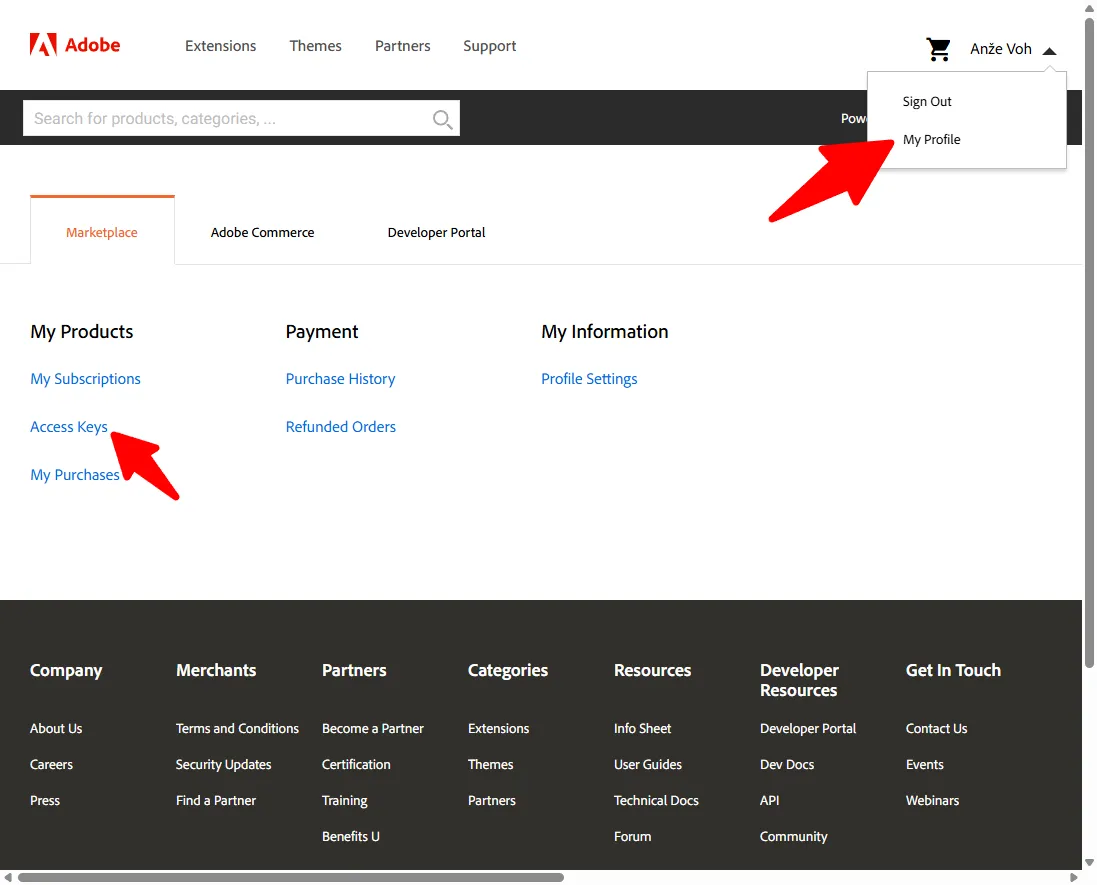
Za prenos lahko, da boste potrebovali Magento API ključ, ki ga lahko pridobite z registracijo na Magento Marketplace. Če še nimate računa, se najprej registrirajte tukaj. Po prijavi v svoj račun poiščite sekcijo Access Keys (Dostopni ključi), kjer lahko ustvarite nov ključ za Composer. Ta ključ je sestavljen iz dveh delov: Public Key in Private Key. Ko Composer vpraša za uporabniško ime in geslo, kot uporabniško ime vnesite Public Key, kot geslo pa Private Key.
3. Namestitev in osnovna konfiguracija
Po uspešni namestitvi lahko Magento 2 konfigurirate bodisi preko terminala, bodisi preko grafičnega vmesnika (Magento Web Setup Wizard), kjer lahko enostavno nastavite osnovne parametre trgovine in administratorski račun.
Za namestitev in nastavitev osnovnih parametrov uporabite ukaz:
php bin/magento setup:install \
--base-url=https://vasadomena.si \
--db-host=localhost \
--db-name=ime_baze \
--db-user=uporabnik_baze \
--db-password=geslo_baze \
--admin-firstname=Ime \
--admin-lastname=Priimek \
--admin-email=vas.email@domena.si \
--admin-user=admin \
--admin-password=MojeSifriranoGeslo123 \
--language=sl_SI \
--currency=EUR \
--use-rewrites=1 \
--disable-modules=Magento_TwoFactorAuth,Magento_AdminAdobeImsTwoFactorAuth
Ta ukaz ustvari bazo, nastavi URL, administratorski račun, jezik in valuto ter izklopi module, ki jih ne boste uporabljali.
4. Izklop Elasticsearch (opcijsko)
Privzeto Magento uporablja Elasticsearch za iskanje izdelkov. Če ga ne uporabljate predvsem, ko imate deljeno gostovanje, preklopite na MySQL:
composer config repositories.swissup composer https://docs.swissuplabs.com/packages/
composer require swissup/module-search-mysql-legacy --prefer-source --ignore-platform-reqs
bin/magento module:enable Swissup_SearchMysqlLegacy Swissup_Core
php bin/magento config:set catalog/search/engine 'lmysql'
5. Izklop nepotrebnih modulov
Če ne uporabljate dvofaktorske prijave ali Elasticsearcha, jih izklopite:
php bin/magento module:disable Magento_TwoFactorAuth Magento_AdminAdobeImsTwoFactorAuth6. Končni koraki za zagon trgovine
Po namestitvi izvedite še naslednje ukaze:
php bin/magento cache:clean
php bin/magento cache:flush
php bin/magento setup:upgrade
php bin/magento setup:di:compile
php bin/magento setup:static-content:deploy -f
Ti ukazi počistijo predpomnilnike, posodobijo sistem in pripravijo statično vsebino.
7. Prijava v admin panel
Odprite brskalnik in pojdite v administracijo. Uporabite administratorja in geslo, ki ste ju nastavili pri namestitvi.
Url do adminsitracije dobite po uspešni namestitvi preko uporabniškega vmesnika ali preko terminala,
[SUCCESS]: Magento installation complete.
[SUCCESS]: Magento Admin URI: /admin_krg7qvd
Po tem je vaša Magento 2 trgovina pripravljena za konfiguracijo in dodajanje izdelkov.


